
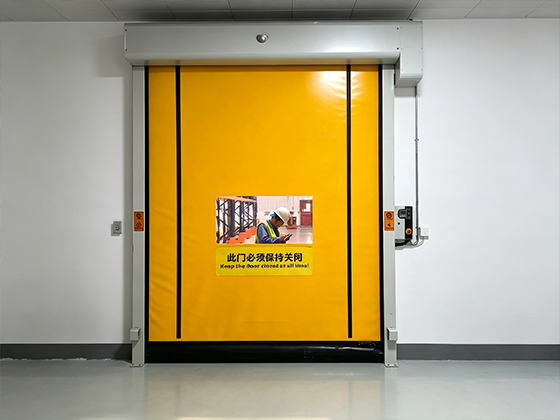
In a busy warehouse or factory, a forklift can accidentally push a flexible door curtain out of its side guides. With a conventional door, this may mean stopping operations and manually repositioning the curtain. A High Speed Zipper Door Automatic Reset System is designed to reduce this disruption by helping the curtain re-engage with its guides after certain impacts.
But how does this mechanism work, and what should industrial buyers know before choosing one? Let’s break it down.
What Is a High Speed Zipper Door Automatic Reset System?
Understanding the Self-Resetting Design
A high speed zipper door uses specially shaped curtain edges that engage with matching side guides. The automatic reset function is designed to help the curtain return to its normal guided position after a suitable displacement.
Unlike a system that requires manual repositioning after every minor curtain dislodgement, a self-resetting design may restore normal operation through a subsequent door cycle.
Why Is It Important?
In high-traffic environments, even a short interruption can affect material handling and production schedules. Automatic reset functionality can reduce manual intervention and help the facility resume normal operations sooner.
However, not every collision can be resolved automatically. Performance depends on the door design, impact severity, and condition of its components.
How Does the Automatic Reset System Work?
1. Step One: Normal Door Operation
During normal operation, the motor moves the flexible curtain along the side guides. The zipper-style edges help maintain curtain alignment as the door opens and closes.
2. Step Two: Curtain Displacement
If a suitable impact pushes the curtain out of its guides, the curtain may become partially disengaged. The reset mechanism is designed to accommodate certain types of displacement without requiring immediate manual repositioning.
3. Step Three: Automatic Re-Engagement
When the door operates again, the curtain edges can reconnect with the side guides according to the system’s design. Once properly engaged, the curtain can continue moving along its intended path.
Does It Reset After Every Collision?
No. Severe impacts, damaged guides, torn curtain edges, or mechanical faults may prevent automatic recovery. The door should be inspected whenever damage or abnormal operation is suspected.
Key Components Behind the Reset Function
1. Zipper Curtain and Side Guides
The curtain edges and guide profiles form the core of the re-engagement mechanism. Their design and alignment influence how reliably the curtain returns to position.
2. Motor and Drive System
The motor provides the movement needed to raise and lower the curtain. Its configuration should match the door dimensions, operating speed, and expected daily cycles.
3. Control System and Safety Devices
The control system manages door movement and may support automatic closing, sensors, and other operating functions. Safety devices help detect obstacles and reduce risks during operation.
Important Safety Reminder
Automatic reset is not a substitute for safety protection. Confirm that the selected door includes appropriate safety devices and follows the applicable installation and operating requirements.
Benefits of an Automatic Reset System
1. Reduced Operational Downtime
When the curtain can recover from suitable displacements, staff may spend less time manually repositioning it. This is particularly useful in facilities with frequent forklift or trolley traffic.
2. Lower Collision-Related Maintenance Intervention
Automatic recovery can reduce certain service interruptions, although routine inspection and repairs remain necessary.
3. Improved Workflow Efficiency
High speed operation and reduced recovery time can help keep warehouse and production traffic moving.
4. Better Curtain Alignment
The zipper-style guide structure helps retain the curtain during normal operation and can support effective separation between working areas when correctly installed.
How to Maintain the Automatic Reset System
Inspect the Curtain and Guides
Check for tears, worn zipper edges, debris, loose components, and visible guide damage. Keep the operating area clean and follow the manufacturer’s maintenance schedule.
Test the Door Safely
Inspect abnormal movement, unusual noise, and sensor response. Do not deliberately create collisions to test the reset function. Any functional testing should follow the manufacturer’s approved procedure.
Arrange Repairs When Needed
If the curtain repeatedly disengages or fails to reset, stop using the door when it may be unsafe and contact qualified service personnel. Repeated reset failures may indicate alignment problems or damaged components.
What Should Buyers Check Before Ordering?
Confirm the Reset Mechanism
Ask the manufacturer how the curtain re-engages, what types of displacement the system can handle, and what conditions require manual repair.
Compare Specifications and Support
Review door dimensions, curtain material, operating speed, safety devices, warranty terms, spare-part availability, and technical support.
Why Choose VelocityDoor?
Manufacturing Experience and OEM/ODM Support
VelocityDoor is established in 2008. We serve international distributors, contractors, and industrial buyers with industrial door solutions and customization support.
Our team can help assess your opening dimensions, traffic conditions, and project requirements to discuss suitable door configurations.
Explore Our Other Industrial Door Products
Our product range also includes:
- PVC High Speed Doors for warehouses and factories
- Spiral High Speed Doors for fast operation and rigid panels
- High Speed Stacking Doors for large industrial openings
- High Speed Freezer Doors for cold storage facilities
- Industrial Sectional Overhead Doors for industrial buildings
- Loading Dock Levelers for loading and unloading operations
Contact Us for Your Industrial Door Project
An automatic reset system can be valuable in high-traffic facilities, but the right solution depends on your operating conditions and required recovery performance.
With manufacturing experience, factory-oriented supply, and OEM/ODM support, VelocityDoor works with international B2B buyers to explore suitable industrial door solutions.
Contact us today with your door dimensions, application, operating frequency, and project quantity. Our team will help you evaluate suitable configurations and request a quotation for your project.